

Tresavis
Benvinguts al blog de tresavis de noves tecnologies i més.
Correu : tresavis3@gmail.com


Alarma amb avis a Telegram, utilitzant la placa ESP32-CAM.
Descripció.
En aquesta practica amb la placa ESP32-CAM, un sensor de moviment i un BOT de Telegram volem que al detectar moviment envií la foto del intrús al nostre compte de Telegram. També poder saber la humitat i la temperatura que ens dona el sensor GY-BME/P280.
Contingut:
- Estudis previs.
- BOT de Telegram.
- Components per desenvolupar la practica i circuit.
- Llibreries.
- Comandos que accepta el Bot de Telegram.
- Connexió de ESP32-CAM amb el programador FTDI.
- Codi.
- Explicacions del codi.
- Resultat.
- Bibliografia.

BOT de Telegram.
Esp32-CAM pot interactuar amb un BOT de Telegram per rebre missatges codificar-los i enviar resposta a la nostre compte de Telegram com fotos i lectura de sensors.
Per informació de com crear un BOT, es pot visitar la pagina:
esp32-cam-telegram.phpComponents per desenvolupar la practica i circuit.
Mòdul ESP32-CAM AI-Thinker amb la càmera OV2640.
Programador FTDI per pujar el codi a la placa.
Sensor de moviment mini PIR.
Sensor de temperatura i humitat GY-BME/P280.
Bot de Telegram.
Alimentador a 5 V.
Cable USB-miniUSB.
Arduino IDE.
Protoboard i cables.
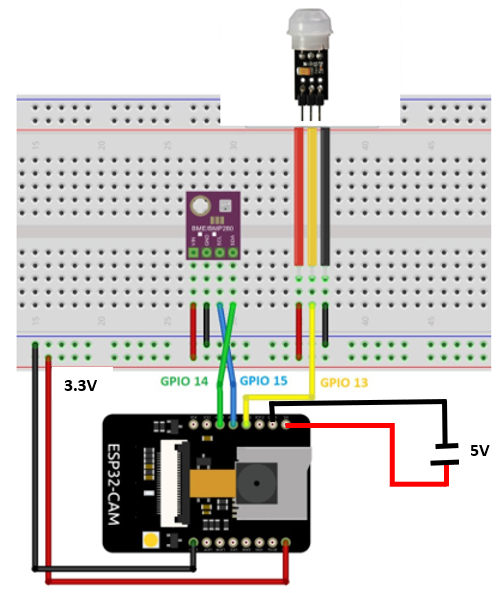
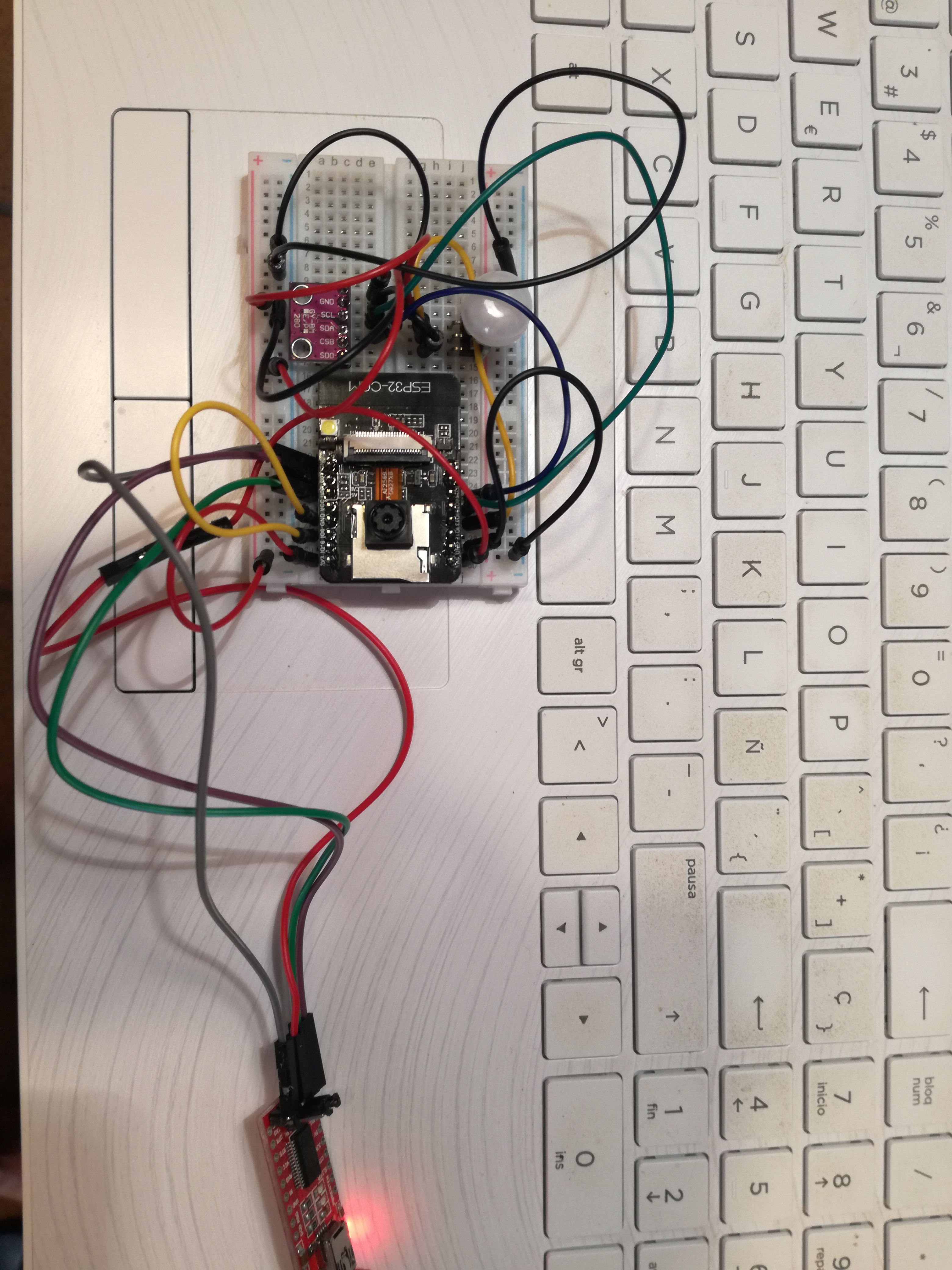
Construïm el circuit amb la protoboard i les connexions adients i veiem que hi ha masses cables i que tapen la lent de la càmera.
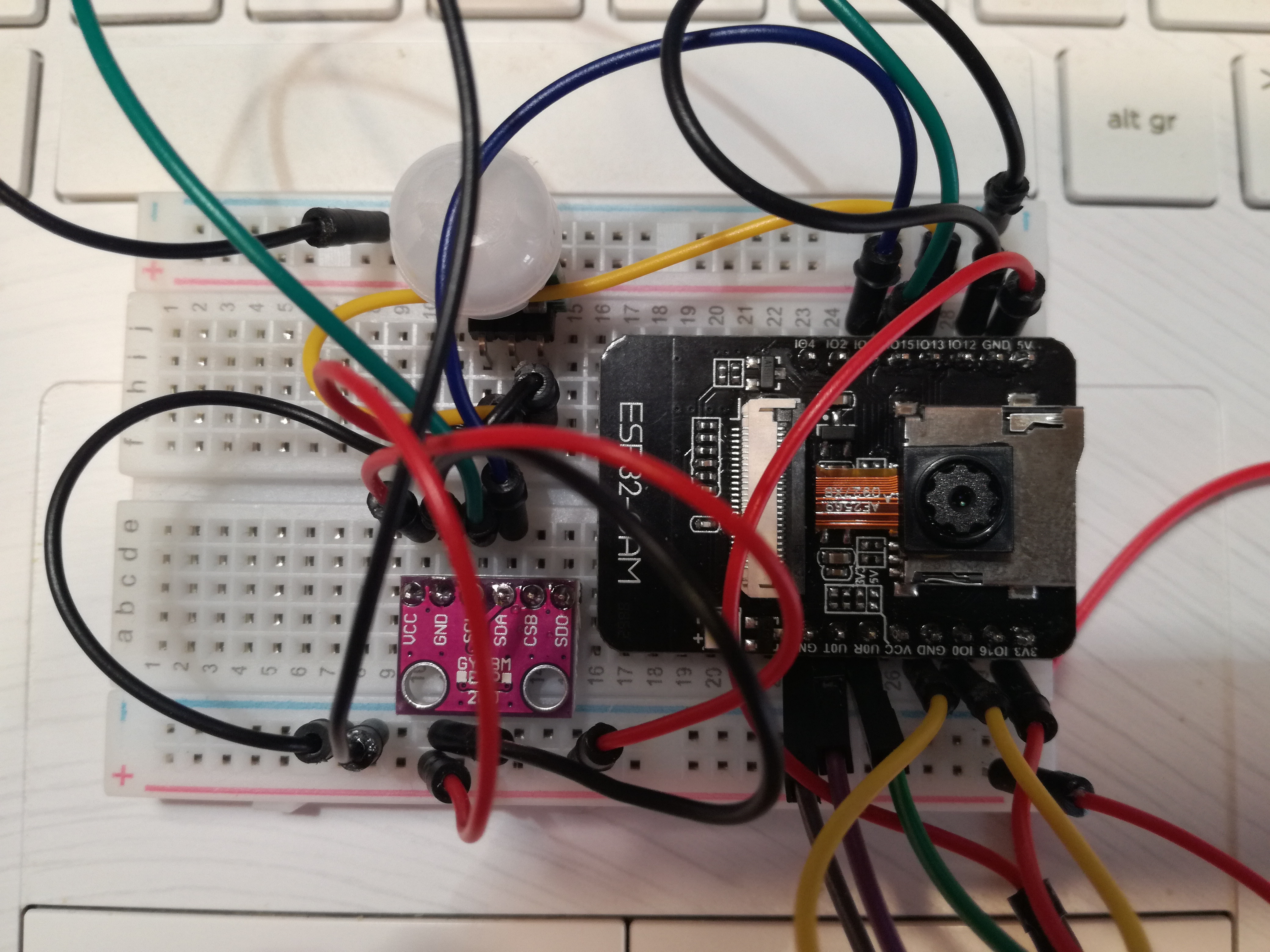
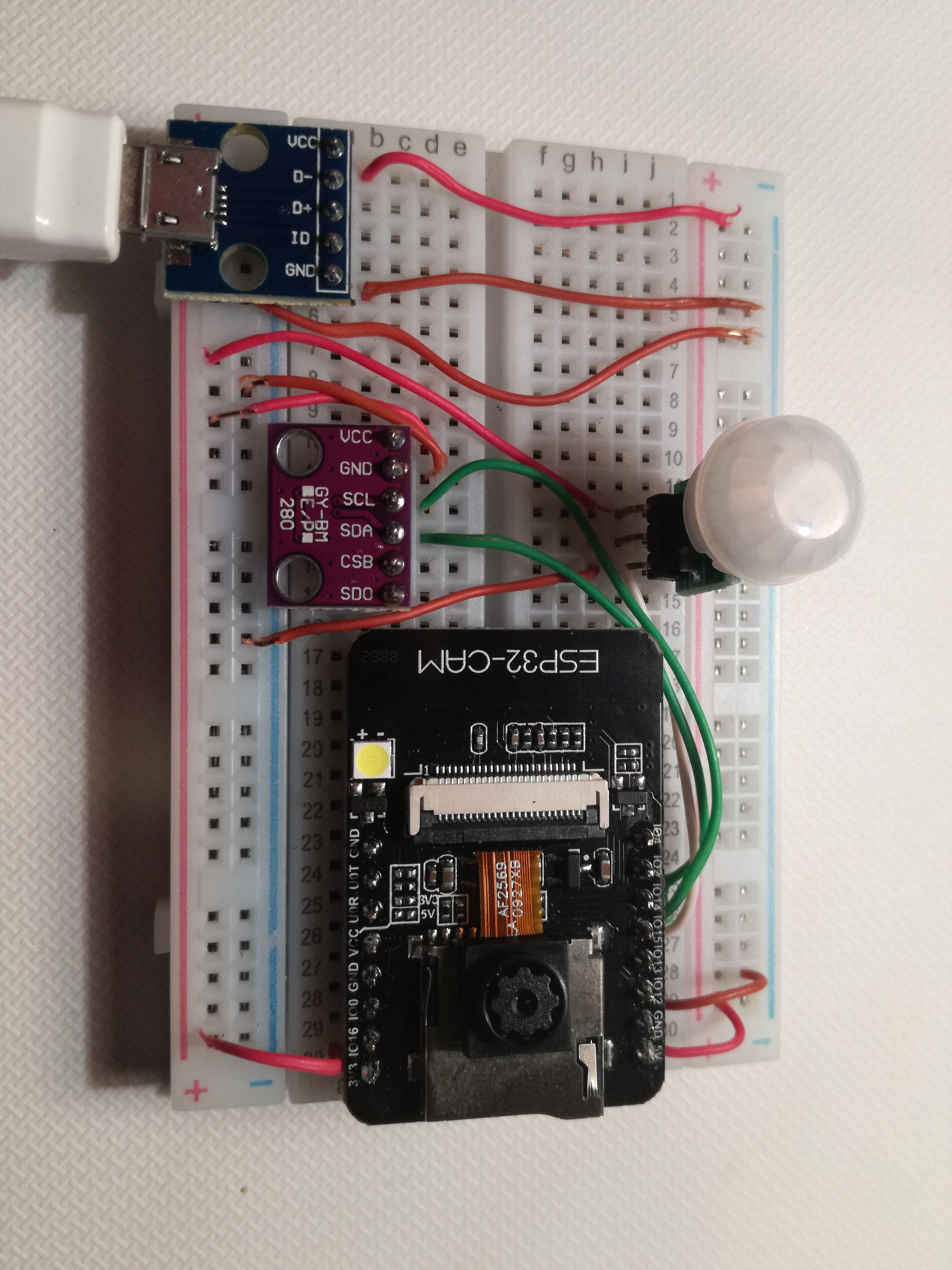
Millorem les connexions i el resultat es el següent:
Llibreries.
Per interactuar amb Telegram utilitzem la llibreria Universal Telegram Bot Library de Brian Lough.
Pagina per descarregar la llibreria:
https://github.com/witnessmenow/Universal-Arduino-Telegram-Bot/archive/master.zipEn el IDE de Arduino anar a Esbós/Inclou biblioteca/Afegeix una biblioteca .ZIP... i seleccionar la carpeta descarregada.
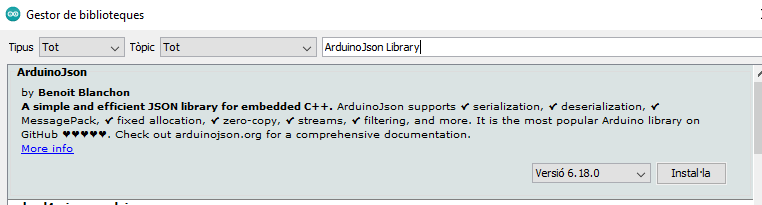
ArduinoJson Library de Benoit Blanchon.
La instalen des del gestor de biblioteques.
També tenim que instal·lar la llibreria BME280 SpackFun, per poder treballar amb els sensor de temperatura i humitat. En altres projectes amb els sensor BME280 utilitzem la llibreria Adafruit_BME280, però en aquest cas entra en conflicte amb les altres llibreries. Per instal·lar BME280 SpackFun ho fem des de el IDE, en eines/gestiona les biblioteques.
Comandos que accepta el Bot de Telegram.
Una vegada creat el Bot podem establir una conversa amb el microcontrolador ESP32.
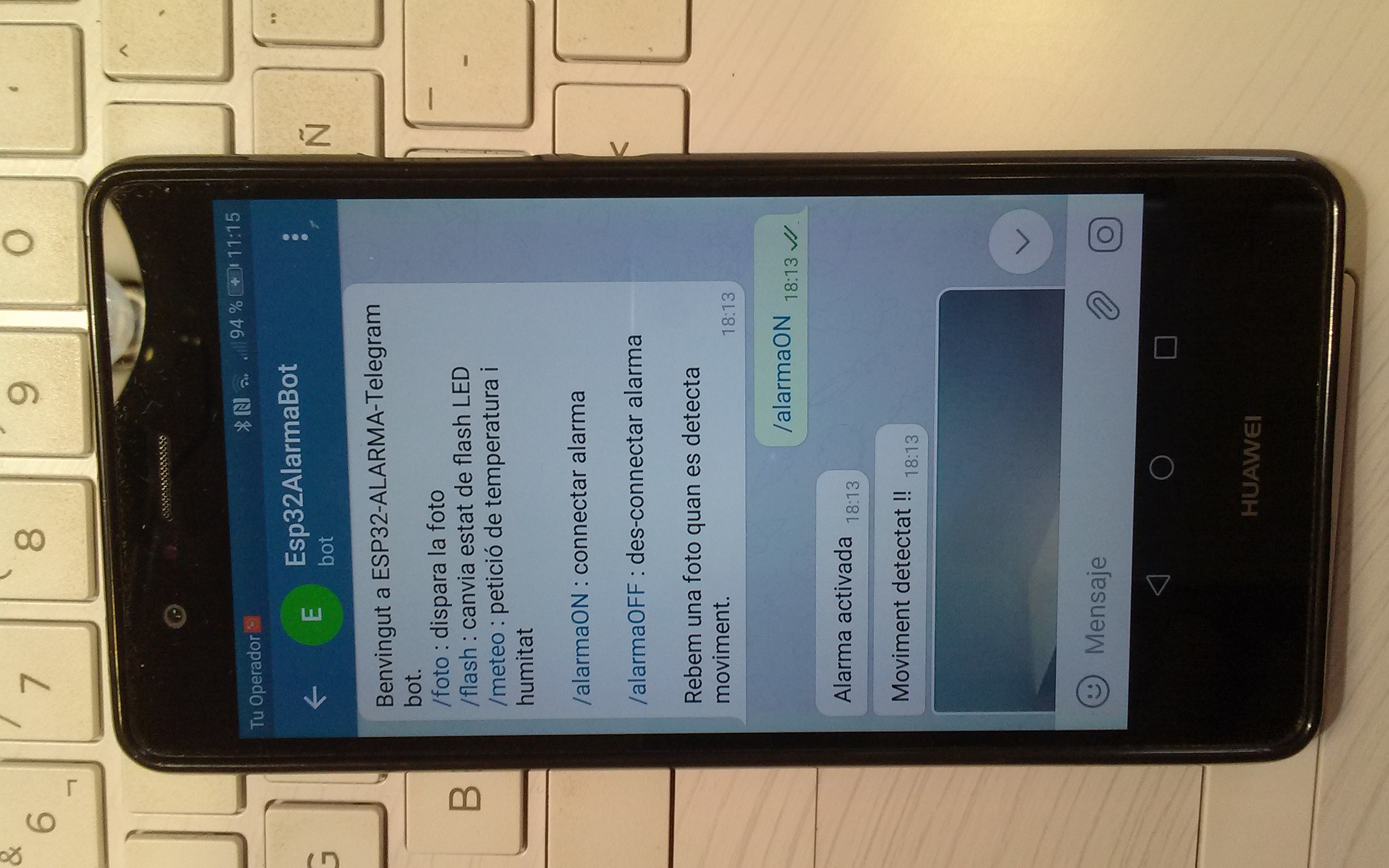
Els comandos per interactuar son:/start, /foto, /flash, /alarmaON, /alarmaOFF.
/start. Al enviar aquest missatge la resposta es un missatge de benvinguda amb tots el comandos de control de la placa.
/foto. La placa ESP32-CAM dispara una foto i respon enviant-la per Telegram.
/flash.ESP32-CAM al rebre aquest missatge encén el led de la placa. Si es troba encès l’apaga.
/meteo.ESP32-CAM envia les lectures de temperatura i humitat.
/alamaON.La placa activa el sensor de moviment.
/alamaOFF.La placa des-activa el sensor de moviment.
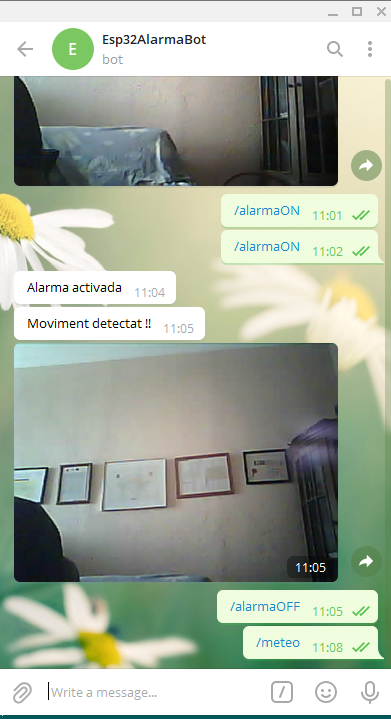
Al detectar moviment envia automàticament una foto per Telegram.
Connexió de ESP32-CAM amb el programador FTDI.
Per pujar el programa a la placa necessitem un programador FTDI.
A l’hora de pujar el codi es necessari fer un pont entre els pins GND i IO0 i fer un reset. El pont es treu una vegada ja sa pujat el codi.
Comprovar el jumper del FTDI que estigui en 5V i no en 3.3V.
Per mes informació visitar la pàgina:
esp32-cam.php#conexio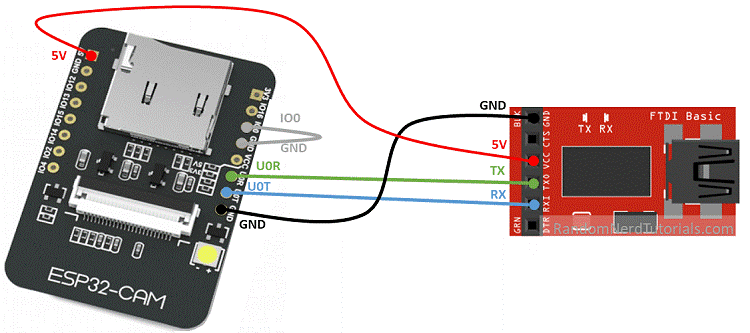
CODI.
esp32-alarma-telegramV2.ino
/*
  Rui Santos
  Complete project details at https://TresAvis.com/esp32-cam-shield-pcb-telegram/
  CODI MODIFICAT PER TRESAVIS https://tresavis.cat
  Project created using Brian Lough's Universal Telegram Bot Library: https://github.com/witnessmenow/Universal-Arduino-Telegram-Bot

  The above copyright notice and this permission notice shall be included in all
  copies or substantial portions of the Software.
*/

#include <WiFi.h>
#include <WiFiClientSecure.h>
#include "soc/soc.h"
#include "soc/rtc_cntl_reg.h"
#include "esp_camera.h"
#include <UniversalTelegramBot.h>
#include <ArduinoJson.h>
#include <Wire.h>
#include "SparkFunBME280.h"

// Parametres WiFi
const char* ssid = "mirablau";
const char* password = "********";

// Use @myidbot to find out the chat ID of an individual or a group
// Also note that you need to click "start" on a bot before it can
// message you
String chatId = "**********";

// Initialize Telegram BOT
// bot token obtingut del gotFather
String BOTtoken = "**********:******_**************************";

bool sendPhoto = false;

WiFiClientSecure clientTCP;

// Inicialitza el bot amb el token i clientTCP
UniversalTelegramBot bot(BOTtoken, clientTCP);

//CAMERA_MODEL_AI_THINKER
#define PWDN_GPIO_NUM     32
#define RESET_GPIO_NUM    -1
#define XCLK_GPIO_NUM      0
#define SIOD_GPIO_NUM     26
#define SIOC_GPIO_NUM     27

#define Y9_GPIO_NUM       35
#define Y8_GPIO_NUM       34
#define Y7_GPIO_NUM       39
#define Y6_GPIO_NUM       36
#define Y5_GPIO_NUM       21
#define Y4_GPIO_NUM       19
#define Y3_GPIO_NUM       18
#define Y2_GPIO_NUM        5
#define VSYNC_GPIO_NUM    25
#define HREF_GPIO_NUM     23
#define PCLK_GPIO_NUM     22

// led flash de la placa ESP32
#define FLASH_LED_PIN 4
bool flashState = LOW;

// Motion Sensor
bool motionDetected = false;
// variable booleana alarma
bool alarma = false;

// Define I2C Pins for BME280
#define I2C_SDA 14
#define I2C_SCL 15

// Sensor de temperatura i humitat
BME280 bme;

int botRequestDelay = 1000;   // mean time between scan messages
long lastTimeBotRan;     // last time messages' scan has been done

// Prototips (enunciats) de les funcions a utilitzar, que s'implementan al final del codi
// gestiona els nou missatges rebuts, com a parametre el numero de missatges
void handleNewMessages(int numNewMessages);
// Envia la foto a Telegram, retorna un String
String sendPhotoTelegram();
// Llegeix la temperatura i la humitat del sensor BME280, retornant la lectura
String getReadings();


// Indicates when motion is detected
static void IRAM_ATTR detectsMovement(void * arg){
  //Serial.println("MOTION DETECTED!!!");
  motionDetected = true;
}

//////////////////////////////  setup() //////////////////////////////////
void setup(){
  // Deshabilita posibles aturades per falta de potencia
  WRITE_PERI_REG(RTC_CNTL_BROWN_OUT_REG, 0);
  Serial.begin(115200);

  pinMode(FLASH_LED_PIN, OUTPUT);
  digitalWrite(FLASH_LED_PIN, flashState);

  // Init BME280 sensor
  Wire.begin(I2C_SDA, I2C_SCL);
  bme.settings.commInterface = I2C_MODE;
  bme.settings.I2CAddress = 0x76;
  bme.settings.runMode = 3;
  bme.settings.tStandby = 0;
  bme.settings.filter = 0;
  bme.settings.tempOverSample = 1;
  bme.settings.pressOverSample = 1;
  bme.settings.humidOverSample = 1;
  bme.begin();

  WiFi.mode(WIFI_STA);
  Serial.println();
  Serial.print("Connecting to ");
  Serial.println(ssid);
  WiFi.begin(ssid, password);
  clientTCP.setCACert(TELEGRAM_CERTIFICATE_ROOT); // Add root certificate for api.telegram.org
  while (WiFi.status() != WL_CONNECTED) {
    Serial.print(".");
    delay(500);
  }
  Serial.println();
  Serial.print("ESP32-CAM IP Address: ");
  Serial.println(WiFi.localIP());

  camera_config_t config;
  config.ledc_channel = LEDC_CHANNEL_0;
  config.ledc_timer = LEDC_TIMER_0;
  config.pin_d0 = Y2_GPIO_NUM;
  config.pin_d1 = Y3_GPIO_NUM;
  config.pin_d2 = Y4_GPIO_NUM;
  config.pin_d3 = Y5_GPIO_NUM;
  config.pin_d4 = Y6_GPIO_NUM;
  config.pin_d5 = Y7_GPIO_NUM;
  config.pin_d6 = Y8_GPIO_NUM;
  config.pin_d7 = Y9_GPIO_NUM;
  config.pin_xclk = XCLK_GPIO_NUM;
  config.pin_pclk = PCLK_GPIO_NUM;
  config.pin_vsync = VSYNC_GPIO_NUM;
  config.pin_href = HREF_GPIO_NUM;
  config.pin_sscb_sda = SIOD_GPIO_NUM;
  config.pin_sscb_scl = SIOC_GPIO_NUM;
  config.pin_pwdn = PWDN_GPIO_NUM;
  config.pin_reset = RESET_GPIO_NUM;
  config.xclk_freq_hz = 20000000;
  config.pixel_format = PIXFORMAT_JPEG;

  //init with high specs to pre-allocate larger buffers
  if(psramFound()){
    config.frame_size = FRAMESIZE_UXGA;
    config.jpeg_quality = 10;  //0-63 lower number means higher quality
    config.fb_count = 2;
  } else {
    config.frame_size = FRAMESIZE_SVGA;
    config.jpeg_quality = 12;  //0-63 lower number means higher quality
    config.fb_count = 1;
  }

  // camera init
  esp_err_t err = esp_camera_init(&config);
  if (err != ESP_OK) {
    Serial.printf("Camera init failed with error 0x%x", err);
    delay(1000);
    ESP.restart();
  }

  // Drop down frame size for higher initial frame rate
  sensor_t * s = esp_camera_sensor_get();
  s->set_framesize(s, FRAMESIZE_CIF);  // UXGA|SXGA|XGA|SVGA|VGA|CIF|QVGA|HQVGA|QQVGA

  // PIR Motion Sensor mode INPUT_PULLUP
  //err = gpio_install_isr_service(0);
  err = gpio_isr_handler_add(GPIO_NUM_13, &detectsMovement, (void *) 13);
  if (err != ESP_OK){
    Serial.printf("handler add failed with error 0x%x \r\n", err);
  }
  err = gpio_set_intr_type(GPIO_NUM_13, GPIO_INTR_POSEDGE);
  if (err != ESP_OK){
    Serial.printf("set intr type failed with error 0x%x \r\n", err);
  }
}

////////////////////////////////  loop()  ////////////////////////////////////////////
void loop(){
  if (sendPhoto){
    Serial.println("Preparing photo");
    sendPhotoTelegram();
    sendPhoto = false;
  }

  if(alarma && motionDetected){
    bot.sendMessage(chatId, "Moviment detectat !!", "");
    Serial.println("Moviment Detectat");
    sendPhotoTelegram();
    motionDetected = false;
  }

  if (millis() > lastTimeBotRan + botRequestDelay){
    int numNewMessages = bot.getUpdates(bot.last_message_received + 1);
    while (numNewMessages){
      Serial.println("got response");
      handleNewMessages(numNewMessages);
      numNewMessages = bot.getUpdates(bot.last_message_received + 1);
    }
    lastTimeBotRan = millis();
  }
}

/////////////////////////////  sendPhotoTelegram()  ////////////////////////////////////////
String sendPhotoTelegram(){
  const char* myDomain = "api.telegram.org";
  String getAll = "";
  String getBody = "";

  camera_fb_t * fb = NULL;
  fb = esp_camera_fb_get();
  if(!fb) {
    Serial.println("Camera capture failed");
    delay(1000);
    ESP.restart();
    return "Camera capture failed";
  }

  Serial.println("Connect to " + String(myDomain));

  if (clientTCP.connect(myDomain, 443)) {
    Serial.println("Connection successful");

    String head = "--TresAvis\r\nContent-Disposition: form-data; name=\"chat_id\"; \r\n\r\n" + chatId + "\r\n--TresAvis\r\nContent-Disposition: form-data; name=\"photo\"; filename=\"esp32-cam.jpg\"\r\nContent-Type: image/jpeg\r\n\r\n";
    String tail = "\r\n--TresAvis--\r\n";

    uint16_t imageLen = fb->len;
    uint16_t extraLen = head.length() + tail.length();
    uint16_t totalLen = imageLen + extraLen;

    clientTCP.println("POST /bot"+BOTtoken+"/sendPhoto HTTP/1.1");
    clientTCP.println("Host: " + String(myDomain));
    clientTCP.println("Content-Length: " + String(totalLen));
    clientTCP.println("Content-Type: multipart/form-data; boundary=TresAvis");
    clientTCP.println();
    clientTCP.print(head);

    uint8_t *fbBuf = fb->buf;
    size_t fbLen = fb->len;
    for (size_t n=0;n<fbLen;n=n+1024) {
      if (n+1024<fbLen) {
        clientTCP.write(fbBuf, 1024);
        fbBuf += 1024;
      }
      else if (fbLen%1024>0) {
        size_t remainder = fbLen%1024;
        clientTCP.write(fbBuf, remainder);
      }
    }

    clientTCP.print(tail);

    esp_camera_fb_return(fb);

    int waitTime = 10000;   // timeout 10 seconds
    long startTimer = millis();
    boolean state = false;

    while ((startTimer + waitTime) > millis()){
      Serial.print(".");
      delay(100);
      while (clientTCP.available()) {
        char c = clientTCP.read();
        if (state==true) getBody += String(c);
        if (c == '\n') {
          if (getAll.length()==0) state=true;
          getAll = "";
        }
        else if (c != '\r')
          getAll += String(c);
        startTimer = millis();
      }
      if (getBody.length()>0) break;
    }
    clientTCP.stop();
    Serial.println(getBody);
  }
  else {
    getBody="Connected to api.telegram.org failed.";
    Serial.println("Connected to api.telegram.org failed.");
  }
  return getBody;
}

////////////////////////////  handleNewMessages(int numNewMessages) //////////////////////
void handleNewMessages(int numNewMessages){
  Serial.print("Handle New Messages: ");
  Serial.println(numNewMessages);

  for (int i = 0; i < numNewMessages; i++){
    // Chat id of the requester
    String chat_id = String(bot.messages[i].chat_id);
    if (chat_id != chatId){
      bot.sendMessage(chat_id, "Unauthorized user", "");
      continue;
    }

    // Print the received message
    String text = bot.messages[i].text;
    Serial.println(text);

    String fromName = bot.messages[i].from_name;

    if (text == "/flash") {
      flashState = !flashState;
      digitalWrite(FLASH_LED_PIN, flashState);
    }
    if (text == "/foto") {
      sendPhoto = true;
      Serial.println("New photo  request");
    }
    if (text == "/alarmaON") {
      alarma = true;
      Serial.println("alarma activada");
       bot.sendMessage(chatId, "Alarma activada", "");
    }
     if (text == "/alarmaOFF") {
      alarma = false;
      Serial.println("alarma des-activada");
      bot.sendMessage(chatId, "Alarma des-activada", "");
    }
    if (text == "/meteo"){
      String readings = getReadings();
      bot.sendMessage(chatId, readings, "");
    }
    if (text == "/start"){
      String welcome = "Benvingut a ESP32-ALARMA-Telegram bot.\n";
      welcome += "/foto : dispara la foto\n";
      welcome += "/flash : canvia estat de flash LED\n";
      welcome += "/meteo : petició de temperatura i humitat\n\n";
      welcome += "/alarmaON : connectar alarma\n\n";
      welcome += "/alarmaOFF : des-connectar alarma\n\n";
      welcome += "Rebem una foto quan es detecta moviment.\n";
      bot.sendMessage(chatId, welcome, "Markdown");
    }
  }
}

//////////////////////////// Funció getReadings()  ///////////////////////////////////////////
// Get BME280 sensor readings and return them as a String variable
String getReadings(){
  float temperature, humidity;
  temperature = bme.readTempC();
  //temperature = bme.readTempF();
  humidity = bme.readFloatHumidity();
  String message = "Temperatura: " + String(temperature) + " ºC \n";
  message += "Humitat: " + String (humidity) + " % \n";
  return message;
}
Explicacions del codi.
Cal visitar la pagina:
esp32-cam-telegram.php#explicacionsAquí expliquem les part diferents de la practica anterior.
Tenim tres variables Booleanas, que inicialment estan en fals. Son els estats de moviment, de l’alarma i sendPhoto.
// Motion Sensor
bool motionDetected = false;
// variable booleana alarma
bool alarma = false;
bool sendPhoto = false;
La funció detectsMovement() es una funció callback que es cridada quan es detecta moviment, el que fa es que posa la variable motionDetected a true.
// Indicates when motion is detected
static void IRAM_ATTR detectsMovement(void * arg){
  //Serial.println("MOTION DETECTED!!!");
  motionDetected = true;
}
En el loop(), si alarma es true i motionDetected es true, envia la foto.
  if(alarma && motionDetected){
    bot.sendMessage(chatId, "Moviment detectat !!", "");
    Serial.println("Moviment Detectat");
    sendPhotoTelegram();
    motionDetected = false;
  }
Sensor de temperatura, humitat, BME280. Definim els pins SDA i SCL:
// Define I2C Pins for BME280
#define I2C_SDA 14
#define I2C_SCL 15
Es crea una instancia de la classe BME280 anomenat bme:
// Sensor de temperatura i humitat
BME280 bme;
Inicialitzem el sensor BME280:
  // Init BME280 sensor
  Wire.begin(I2C_SDA, I2C_SCL);
  bme.settings.commInterface = I2C_MODE;
  bme.settings.I2CAddress = 0x76;
  bme.settings.runMode = 3;
  bme.settings.tStandby = 0;
  bme.settings.filter = 0;
  bme.settings.tempOverSample = 1;
  bme.settings.pressOverSample = 1;
  bme.settings.humidOverSample = 1;
  bme.begin();
La funció getReadings() retorna un String amb les lectures de temperatura i humitat.
// Get BME280 sensor readings and return them as a String variable
String getReadings(){
  float temperature, humidity;
  temperature = bme.readTempC();
  //temperature = bme.readTempF();
  humidity = bme.readFloatHumidity();
  String message = "Temperatura: " + String(temperature) + " ºC \n";
  message += "Humitat: " + String (humidity) + " % \n";
  return message;
}
Configurem una interrupció en el pin GPIO 13, quan es detecta moviment:
  err = gpio_isr_handler_add(GPIO_NUM_13, &detectsMovement, (void *) 13);
  if (err != ESP_OK){
    Serial.printf("handler add failed with error 0x%x \r\n", err);
  }
  err = gpio_set_intr_type(GPIO_NUM_13, GPIO_INTR_POSEDGE);
  if (err != ESP_OK){
    Serial.printf("set intr type failed with error 0x%x \r\n", err);
  }
En el loop():
Si la variable sendPhoto es true, la placa envia la foto i torna a posar la variable a false.
  if (sendPhoto){
    Serial.println("Preparing photo");
    sendPhotoTelegram();
    sendPhoto = false;
  }
Quan alarma i motionDetected son true, s’envia foto i es retorna la variable motionDetected a false.
  if(alarma && motionDetected){
    bot.sendMessage(chatId, "Moviment detectat !!", "");
    Serial.println("Moviment Detectat");
    sendPhotoTelegram();
    motionDetected = false;
  }
La placa mira per nous missatges cada segon:
  if (millis() > lastTimeBotRan + botRequestDelay){
    int numNewMessages = bot.getUpdates(bot.last_message_received + 1);
    while (numNewMessages){
      Serial.println("got response");
      handleNewMessages(numNewMessages);
      numNewMessages = bot.getUpdates(bot.last_message_received + 1);
    }
    lastTimeBotRan = millis();
  }
Quan arriba un nou missatge, crida a la funció encarregada de manipular-lo handleNewMessages(numNewMessages). Aquesta funció el que fa es obtenir el missatge rebut del BOT (text) i actuar en cada cas:
    // Print the received message
    String text = bot.messages[i].text;
    Serial.println(text);

    String fromName = bot.messages[i].from_name;

    if (text == "/flash") {
      flashState = !flashState;
      digitalWrite(FLASH_LED_PIN, flashState);
    }
    if (text == "/foto") {
      sendPhoto = true;
      Serial.println("New photo  request");
    }
    if (text == "/alarmaON") {
      alarma = true;
      Serial.println("alarma activada");
       bot.sendMessage(chatId, "Alarma activada", "");
    }
     if (text == "/alarmaOFF") {
      alarma = false;
      Serial.println("alarma des-activada");
      bot.sendMessage(chatId, "Alarma des-activada", "");
    }
    if (text == "/meteo"){
      String readings = getReadings();
      bot.sendMessage(chatId, readings, "");
    }
    if (text == "/start"){
      String welcome = "Benvingut a ESP32-ALARMA-Telegram bot.\n";
      welcome += "/foto : dispara la foto\n";
      welcome += "/flash : canvia estat de flash LED\n";
      welcome += "/meteo : petició de temperatura i humitat\n\n";
      welcome += "/alarmaON : connectar alarma\n\n";
      welcome += "/alarmaOFF : des-connectar alarma\n\n";
      welcome += "Rebem una foto quan es detecta moviment.\n";
      bot.sendMessage(chatId, welcome, "Markdown");
    }
Resultat.
El resultat des de l’aplicació per Windows de Telegram es el següent:
Contingut.
- home INICI.
- Articles.
-
 El mar.
Article que vol descriure els sentiments que el mar ens pot proporcionar. -
 Havaneres.
Article que recull les millors havaneres i fotografies relacionades amb el mar. -
 Lloret antic.
Article de com era el Lloret d’abans. -
 Lloret avui.
Article de com és el Lloret d’avui amb grans fotografies. -
 De cala Morisca a Sa Carabera.
Els freus, les puntes i les roques de Lloret, de cala Morisca fins Sa Carabera. -
 De Sa Carabera a Treumal.
Seguim la costa per mar de tot el terme municipal de Lloret de Mar, de llevant cap a garbí. -
 Lloret en kayak.
Naveguem amb kayak per la costa de Lloret de Mar de llevant cap a garbí. -
 Vígilancia remota.
Sistema de seguretat per vigilar remotament les possibles caigudes o indisposicions de les persones grans que viuen soles. -
 Caixa-tpv.
La caixa registradora amb totes les funcionalitats. -
 Cambrer-app.
Aplicació per mòbil per agilitzar les tasques del cambrer. -
 Client webApp.
Aplicació web per els clients d’un bar restaurant. Al reservar taula el client pot especificar els plats que li agradaria menjar. -
 Relats del banc del si no fos
De sa Caleta de Lloret de Mar. -
 Històries d'ahir
Relats explicats per la gent que cada tarda es reuneix en el banc del si no fos de sa Caleta -
Vídeos antics de Lloret
Compilació de vídeos antics de Lloret de Mar, penjats a YouTube de forma amagada. -
 El caiac
Compilació de vídeos de caiacs i del nostre mar, penjats a YouTube. - Contes.
-
 Contes de l'avi.
Recollim aquí uns quants relats propis, a vegades de caire personal, intimistes i altres de ficció. - Pràctiques de Arduino.
-
 Control d’accés amb contrasenya.
La practica consisteix en dissenyar un simulador per obrir una porta, posant una contrasenya en una teclat. -
 Orgue de llums.
Practica per implementar les llums psicodèliques, llums que varien al ritme de la música. -
 Comparativa de editors Arduino.
Comparativa de editors en format de blocs de Arduino i que estan online i gratuïts. -
 Projecte bon Nadal.
Son dos projectes diferents, simultanis en el temps de construcció. El primer el arbre de nadal i el segon joguina de nadal. -
 Sensor de gas i de fums.
Utilitzant el sensor de gas MQ2 juntament amb Arduino UNO, es vol mesurar la concentració de gas - fum i si pasa de un llindar establert, activar una alarma. -
 Control de la qualitat del aire interior (CO2) amb semàfor LED.
Es un projecte simple per conèixer en tot moment la qualitat del aire que respirem en una estància. - Pràctiques de NodeMCU.
-
 NodeMCU-ThingSpeak
Llegir temperatura i humitat i pujar les dades al núvol de la plataforma ThingSpeak. -
 ThingSpeak.
Diseny d'un servidor WiFi de àrea local, configurat com un punt d'accés per software. -
 NodeMCU com AccessPoint.
ThingSpeak es una plataforma de Internet que guarda dades IoT -
 Control de la llum de casa per web.
Es un projecte de domotica per encendre o apagar la llum de la casa remotament per web. -
 Control de un led per el mòbil.
Es un projecte de domòtica per controlar un led, encès o apagat, remotament per mòbil. -
 Sistema de fitxers en ESP8266.
SPIFFS es un sistema de fitxers lleuger en el chip de la memòria flash que incorpora el ESP8266. -
 Altura del nivell d'aigua.
Es vol mesurar a quina altura es troba el aigua de un recipient. -
 Avis d’alarma a Telegram.
En aquesta pràctica estudiem com enviar notificacions a la nostre compte de Telegram, quan el ESP8266 NodeMCU detecta un salt de alarma. -
 Control de la llum de casa des de Telegram.
Es vol controlar la llum de la casa per Internet, fen servir la aplicació Telegram. -
 Control de la intensitat de llum de un LED per Internet.
El client des de el navegador web, poder regular la intensitat de un led connectat al servidor NodeMCU. Fem servir la tecnologia WebSocket -
 Magatzematge de temperatura i humitat en Thinger.
La practica a realitzar es obtenir i pujar les dades de temperatura i humitat a Thinger.io. -
 Publicar temperatura i humitat en Google Sheets.
Amb la placa NodeMCU (ESP8266 ), volem publicar les lectures del sensor DH22, de temperatura i humitat a un full de càlcul de Google Sheets. -
 ESP8266 i Firebase.
El objectiu de aquesta practica és iniciar-se amb Firebase fen servir la placa de desenvolupament ESP8266 NodeMCU. Firebase és una aplicació de Google per gestionar dades des de Android, IOS o per dades d’una WEB-app. Aprendrem a guardar dades a la base de dades de Firebase i com després llegir-les. -
 ESP8266-BME280 Firebase.
Estudiem com tant la placa ESP8266 com la ESP32 envia les lectures del sensor BME280 de temperatura, humitat i pressió a la base de dades de Firebase. -
 La bàscula. ESP8266 NodeMCU amb cèl·lula de càrrega.
Aprenem a crear una bàscula de cuina mitjançant la placa ESP8266 i una cèl·lula de càrrega amb l’amplificador HX711. - ESP32.
-
 ESP32-CAM
Introducció al funcionament de la placa ES-CAM amb un exemple de prova. -
 ESP32-CAM captura fotos per ser vistes en la WEB.
Enviant ordres a la placa ESP32-CAM, aquesta pren fotos. Amb el navegador podem veure la ultima foto capturada. -
 Pujar fotos a un servidor FTP amb ESP32-CAM.
En aquesta practica fem servir la placa ESP32-CAM per capturar fotos i pujar-les a in servidor FTP. Amb les fotos obtingudes realitzem un vídeo de prova Timelapse. -
 Foto amb ESP32-CAM i Telegram.
En aquesta practica amb la placa ESP32-CAM, i un BOT de Telegram volem disparar una foto remotament des de Telegram i visualitzar-la. També activar el flash de la placa. -
Alarma amb avis a Telegram, utilitzant la placa ESP32-CAM.
En aquesta practica amb la placa ESP32-CAM, un sensor de moviment i un BOT de Telegram volem que al detectar moviment envií la foto del intrús al nostre compte de Telegram. També poder saber la humitat i la temperatura que ens dona el sensor GY-BME/P280. - Programació.
-
 Matemàtiques.
Es plantejant dos problemes matemàtics. El quadre màgic 3x3 i el problema que nomem divisibilitat. -
 App Inventor tutorial.
App Inventor es un servei basat en el núvol, per fer les nostres pròpies Apps per mòbils. -
 MicroPython en ESP8266.
En aquesta practica aprenem com programar el ESP8266 utilitzant MicroPython i el IDE uPyCraft. -
 Visual Estudio Code per Arduino.
En aquesta practica instal·larem el editor VS Code. Configurarem el editor per programar les plaques d’Arduino, també per fer pagines Web i també per poder treballar amb la base de dades remota de Firebase. És un editor mes complert que el editor Arduino IDE. - Intel·ligència artificial.
-
 Classificador d’imatges.
Aplicació per mòbil o tauleta que al enfocar un objecte ens digui el nom del objecte. - Servidors.
-
 Instal·lar i configurar Apache en Ubuntu.
En aquesta practica instal·lem i configurem el servidor Apache en un sistema operatiu Ubuntu. -
 Accés a un servidor Linux remotament.
En aquesta practica estudiem com podem accedir a un host remot Linux Ubuntu. -
 Client i Servidor FTP.
En aquesta pràctica instal·lem i configurem un client i un servidor FTP per la transferència d’arxius remotament. El client en Windows i el servidor en Ubuntu - Màquines virtuals.
-
 Màquina virtual UBUNTU.
En aquesta pràctica instal·lem el sistema operatiu Linux Ubuntu en una maquina virtual de VirtualBox. -
 WindowsXP en Virtualbox.
Instal·lem el sistema operatiu Windows XP en una maquina virtual de VirtualBox. - Electrònica.
-
 Multisim, simulador de circuits electrònics.
Serveix per fer proves amb el circuit, sense tenir que comprar els components i col·locar-los en la protoboard. -
 Proteus, simulador de circuits electrònics.
Proteus és un programari per simular circuits electrònics. Especialment serveix per simular integrats i micro-controladors. Farem proves amb diferents integrats i també amb Arduino. - Base de dades.
-
 MySQL. Instal·lació.
Instal·larem la base de dades de MySQL en Windows 11. La versió que farem servir és MySQL 8.0.33 d’Oracle. MySQL és de codi obert i possiblement la base de dades més utilitzada arreu del món. -
 MySQL. Aplicacions.
El paquet de la base de dades MySQL 8.33 porta tres aplicacions per mantenir la base de dades: La línia de comandos, el Shell i l’aplicació gràfica Workbench. - JAVA.
-
 Netbeans Maven MySQL.
Explicarem com fer una app en Java amb el IDE Netbeans. Usarem l’eina Maven per construir el projecte. Connectarem a una base de dades MySQL. -
 Java+Netbeans+Maven+EclipseLink+Mysql
En aquesta practica fem una aplicació en Java per obtenir dades de la base de dades MySQL. Utilitzem Maven per la construcció del projecte i la llibreria EclipseLink per la persistència. -
 Aplicació d’escriptori JavaFX
Continuació de la practica: Java+Netbeans+Maven+EclipseLink+Mysql. Utilitzant JavaFX la llista de proveïdors es mostra en una taula gràfica. -
 App JavaFX amb SceneBuilder
Continuació de la practica: Aplicació d’escriptori JavaFX. Fem servir SceneBuilder per crear les vistes gràfiques. -
 App Java-Swing
Aplicació d’escriptori per mantenir una base de dades amb Java-Swing. El projecte s’ha dividit en quatre parts i cada part té el seu vídeo-tutorial.
Nosaltres





Tags
Noves tecnologies WEB Arduino Domótica MycroPython NodeMCU IoT Java ESP8266 Lora C++ Programació Server-Client